




 Close
Close
- About pensions
- Your Nest pension
- Investing your pension
- Retirement
- Support
- Member's menu
-
Close
- Home
- About pensions

- Your Nest pension
- Investing your pension
- Retirement
- Support
- Member's menu
-
Close
- Overview
- Take our three-step pension check
- What kind of retirement do you want?
- Calculate your retirement income
- How much should I save for my pension?
- How to grow your pension
- The advantage of saving early
- Why it's never too late to save
- How lifestyle changes affect your savings
- Member's menu
-
Close
- Support
- Help centre
- Contact us
Close
- Adviser's menu
-
Close
- Home
- Why Nest
- Using Nest
- Payroll integration
- Support
- Adviser's menu
-
Close
- Overview
- Technical guides
- Adviser's menu
-
Close
- Support
- Help centre
- Contact us
Coming Soon
You’ll soon have access to the Nest employer portal with a new look and feel. Our employer portal will have a refreshed look and layout, but functionality will stay the same. Some buttons may be in different places, but the steps you follow won’t change so just keep using the portal as normal. It's the first of several steps we're taking to improve how you interact with Nest, with new functionality coming in the next few months so keep an eye out for further communications
How to report an issue
Our team has tested it thoroughly, but if something doesn’t work as you expect, let us know straight away so we can fix it quickly. You can get in touch by webchat or support@nestpensions.org.uk or call us on 0300 020 0393, from 8am to 8pm, Monday to Sunday – and one of our team will be happy to help.

Using Nest
Nest Connect is our online hub for professionals, whether you’re a payroll service provider, bookkeeper or accountant.

Nest Connect puts you in control
You can manage tasks for all your clients through a single log-in, making it quicker and easier to administer multiple companies. Best of all, it’s completely free of charge.
Nest Connect offers lots of smart functionality, tools and templates, so you can:
- easily view and manage all your client accounts
- provide different levels of service, from setting up their Nest account to ongoing management
- add unlimited colleagues to help with administration
- offer a timely, cost-effective service to employers
Giving your clients what they need
You can take on as much or as little of the administration as you and your clients agree on, whether you’re helping them set up their Nest account or managing their entire payroll process.
Manage the pension process
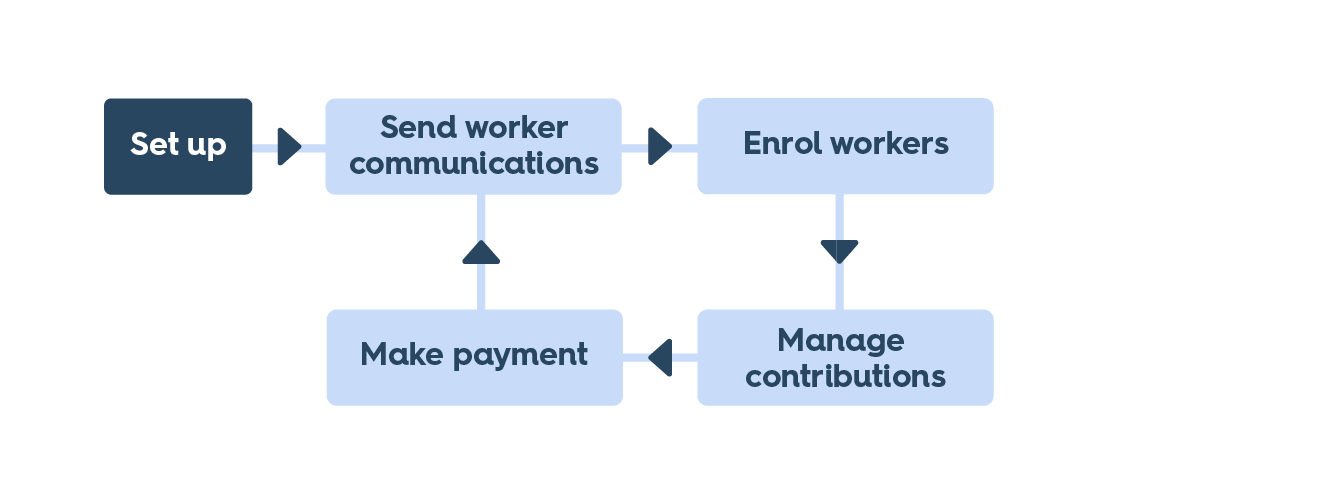
You can manage the whole process for your client from set-up and enrolments to managing statutory communications, contributions and payments. It’s the type of service you can offer on its own or as part of an integrated employee benefits or payroll package to your clients.
Help with specific, regular tasks
Many employers will want to set up Nest themselves and then hand over the day-to-day running of their account to someone else. You can put together contributions schedules and payments and administer new enrolments. It allows you to offer a suite of selected services that your clients can use in a way that meets their needs.
Provide advice and oversight
If your client wants to manage the scheme themselves while asking you to make sure it’s running smoothly for them, opt for ‘read-only access’. This allows you to give your clients the help they need without spending time on administrative tasks they can manage themselves.

Making it easier
Nest Connect allows you to give your clients as much help as they need. And it is free for you to use.

Understand our fees and charges
Nest is completely free for employers to use, and we’ve made sure that charges for members are kept low.