





How workers opt out
In this section

When can a worker opt-out?
A worker’s ‘opt-out period’ is the time they can opt out of the scheme and receive a refund for any contributions they’ve made. You’ll need to tell your workers about this option before you enrol them. To learn more about telling your workers about their new pension rights, read our statutory information when enrolling a new worker guide.
The opt-out period lasts for one calendar month and starts 3 working days after you enrol them – this allows us time to send each worker a welcome letter, which will include their unique Nest ID and a link to our opt-out page.
If a worker asks us for an opt-out form, they need to give it to you within their opt-out period. If you receive the form in time but don’t tell us until after their opt-out period has ended, we’ll still accept their request. But we may already have invested their contributions and taken a contribution charge.
Refunding a worker’s contributions
If the current value of the worker’s pot is lower than their original contributions, we’ll refund the lower amount as well as the contribution charge. This is why you should make sure to tell us about anyone opting out as early as possible.
Once the opt-out period ends, we can’t make any refunds to the worker, and they can no longer opt out.
Checking a worker’s opt-out period
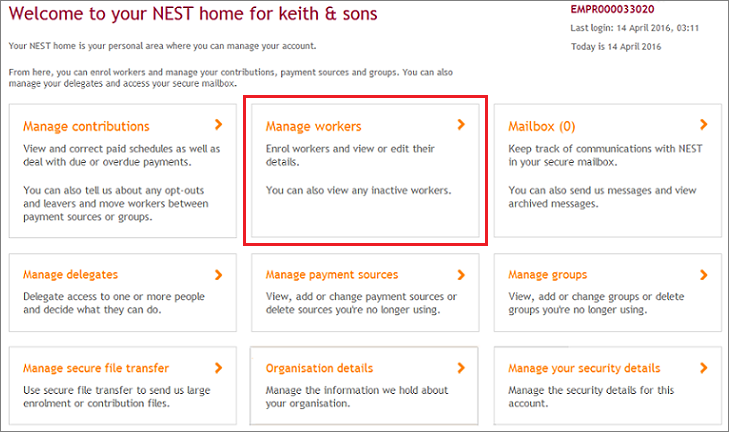
You can check when a worker’s opt-out period ends by selecting ‘Manage workers’ in your online account.
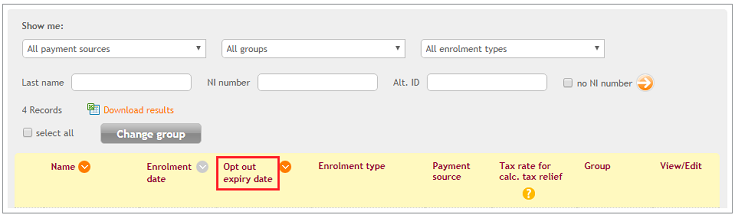
Here, it will list the ‘Opt out expiry date’ for each of your workers who are still in their opt-out period.
You can choose to hold on to a worker’s contribution during their opt-out period instead of paying it into their pension pot. If you decide to do this, please read 'How can I hold on to contributions during a worker’s opt-out period?'
You won’t need to make further contributions for workers who’ve opted out.
We value your feedback
Your feedback is important to us. To help us improve, tell us what you think about our employer help centre by taking a short survey.
Was this helpful to you?
Thank you.


 Live chat
Thank you.
Thank you for the feedback.
Feedback
Was this helpful to you?
Live Chat
Our live help agents will answer your questions and guide you through setting up and managing NEST.
Our chat is available from Monday to Sunday from 8.00AM to 8.00PM
Web chat is currently unavailable
We're open from 10.00 am until 4.00 pm today. Please try again between these hours or our usual business hours of 8am to 8pm Monday to Sunday. Or you can visit our online help centre.
Web chat is currently unavailable
Our offices are now closed for the Bank Holiday. You can reach us during our normal opening times of 8am to 8pm Monday to Sunday. Or you can visit our online help centre.
Welcome to live help
To help us deal with your question quickly please tell us who you are and what you'd like help with by choosing an option from each of the menus below:
